Friday, 8 April 2016

Blazing Angels - Red tape cut for remotely piloted aircraft - DJI Phantom 4 is now in Stock at Macarthur Camera House

In an exciting piece of news just in Time for the Launch of DJI Phantom 4 Stock has just come in with my friends at MacArthur Camera House


Casa has announced changes to remotely piloted aircraft in Australia. Which is great news to budding Aerophotographers in Australia!

You can read the full the media release here.
To Learn more about Zip money
To Learn more about the DJI Phantom 4

The amended remotely piloted aircraft regulations take effect from 29 September 2016.

Commercial operators of very small remotely piloted aircraft will no longer need to obtain a number of regulatory approvals. This includes an operator’s certificate and a remote pilot licence. This applies to remotely piloted aircraft used in commercial operations weighing less than two kilograms maximum take-off weight.

These mandatory conditions include flying only in day visual line of sight, below 120 metres, keeping more than 30 metres away from other people, flying more than 5.5 kilometres from controlled aerodromes and not operating near emergency situations.

The package of changes made to the regulations covering remotely piloted aircraft also permits private landholders to carry out a range of activities on their own land without the need for approvals from CASA.

This includes remotely piloted aircraft up to 25 kilograms in weight where no money is paid for flights.

The new regulations coming into effect in September will cover many popular lightweight drones including the DJI Phantom 2,3 and 4; Xiro Xplorer Vision Drone; Parrot Bepop/AR Drone 2.0; 3DR Solo and Yuneec Typhoon.

Media contact:
Peter Gibson
0419 296 446
peter.gibson@casa.gov.au
Ref: MR2116

Thanks to Australian Photography for the heads up!

Monday, 13 October 2014

Star Wars Force Collection The Battle of Kashyyyk Glitch How to get a larger combo bonus!

A post that is a little different from my photography stuff.

Let me help you with something that I came across, I know a few people like to play games in their time out and I am no different.

I came across a little helper in the game to those wanting to keep the Combo Bonus going a bit longer.

Each time you win a battle you get a new Combo Modifier that levels from 1000 to 10000 after 6 wins.

And from what I can see is that BP (Batle Points) Are hard to come by.

From what I have worked out, if you battle and don't press next to get to the next screen the countdown does not begin until you have clicked next, very handy. So if you are casually playing you can start a battle, leave the device for 5-10 minutes and then press next and the combo timer starts at 10 minutes, handy while charging up your BP's.

Last night I got my Current Winning Streak up to 21 before I ran out of EP and BP. Better than my usual max of 8.

I have found that walking away for 30 minutes doesn't work, I am not sure of the exact time that you can leave it before the counter is cancelled. If you work it out please comment below.


Saturday, 4 October 2014

What is Clear Image Zoom? Is it Optical or Digital Zoom?


Clear Image zoom is Digital Zoom.

What is happening is there is really good algorithms in the camera that fix camera shake and noise so it looks like you are optically zoomed out to the intelligent zoom amount.

Example the Sony DSC-HX60V has a 30x optical zoom and can take you to 60x Clear Image zoom. Allowing you to get that little bit more in before losing sharpness and detail.

Monday, 17 March 2014

Purchasing your next Camera through Studio19.com.au Equipment Rentals

Macarthur Camera House has the new Catalogue out for March 2014 and the big hook is:


Studio19 is a Great new way to own the latest Camera Equipment with easy monthly payments with a Minimum Rental Period of 6 months!

How does this benefit you???

Our rental plan enables you to obtain the products you really desire rather than simply compromising based on what total outlay you could afford. 

With low monthly rental fees and just a minimum rental period of 6 months, our rental program enables you to use the:

Product of Your Dreams!

Pretty fancy right?

This is a brilliant way to get moving forward as all the costs are shown upfront even the buyout cost at the end of the lease, no hidden balloon payments!!!

Ask me a question about Rentals on our Facebook Page https://www.facebook.com/macarthurcamerahouse 

For FAQ About Studio19 check out this link 


When you're just starting out

Obtaining equipment is not necessarily inexpensive. Beginners may be concerned whether the eqiupment is really right for them, even worse purchase below standard products which can have devastating effects on potential development.

Moving forward

Is your current equipment holding you back in your development, but coming up with the total funds for an upgrade proving out of your reach? For a low monthly rental you can now be using the product of your dreams.

For professionals

With Studio19 Rentals you can always get the benefit of the latest technological advancements and features by just upgrading. That way you can ensure you will have the best and most up to date equipment at your fingertips at all times. In many cases you may even be able to claim your rental payments as a tax deduction.

Apply to buy

While minimum rental periods apply, you can still apply to buy at any time.  Ask in store at a Studio19 Agent Macarthur Camera House


Come in for a no obligation discussion to plan your next step in photography!!!

Thanks for reading,

Simon Hornstra

Sunday, 23 September 2012

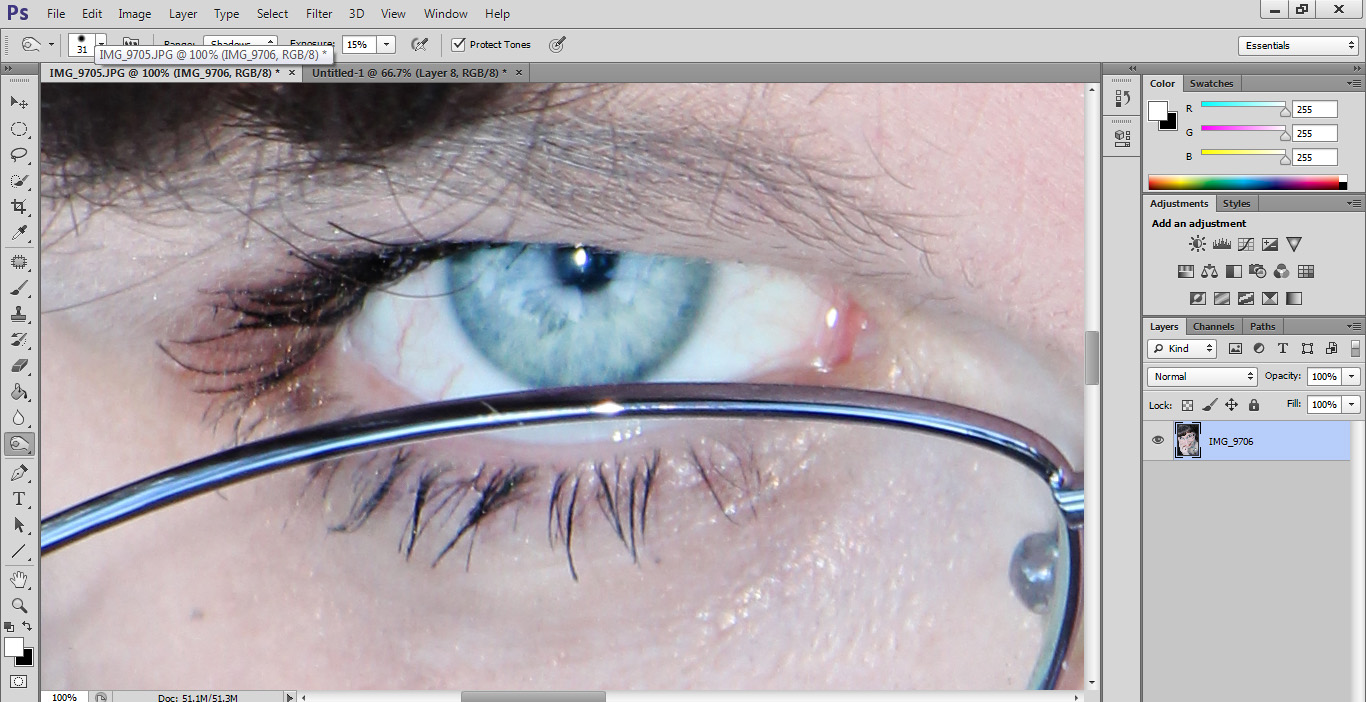
Photoshop Tutorial: Making eyes Pop! Stand out from the crowd.

I did a photo shoot for a friend to help her with some headshots and I did a couple of things to help her stand out from the crowd.


In this tutorial I will be going over how I made her eyes really look great and stand out to catch attention.


We Start with the original image and crop it to make it really get the story that we are trying to share. 


Start by using the Dodge tool, set your hardness to around the 50% mark, so you don't have to worry about being too accurate.


Then apply the dodge to the iris, making the blue's lighter.
Use the burn tool and set it for Shadows, exposure around 15%,  Hardness 75%  so you can be more accurate, and size to suit. Apply the tool to the rim of the iris and go over the pupil if you wish.
I followed this with a burn to the eye-lashes so they stand out more.
And applied to both eyes makes them just pop out at you so your client gets the best results.


Thursday, 6 September 2012

PREVIEW: Sony’s new action POV camera

actioncamera1
http://blog.sony.com/povcamera


Big news for the POV Camera Market, things are about to be shaken up big time!!


Sony is developing a brand new POV camera and the stats are pretty hot. Sony has given us a sneak peak of this device.  Straight from http://blog.sony.com/povcamera 


Our hearts are beating, our blood is flowing, our adrenaline is pumping. Here’s why: Sony’s developing a new type of hi-def wearable video camera for POV and action sports filming, and we’re giving you – our stellar fans – the first look at the device!
Profile shot of the POV Camera, easy to navigate.
Simple buttons to start and stop recording.
Carl Zeiss Tesser Lens baby!
Simple housing, Should withstand the extremes very well.
Going to be amazing!!!

Here is a quote from the Sony Blog:
The video camera is tiny and lightweight, but it houses Sony’s hallmark SteadyShot®image stabilization technology, Exmor® R CMOS image sensor, and an ultra-wide angle Carl Zeiss® Tessar® lens.
That means, whether you’re shredding major powder, jumping out of a plane, or kayaking through an epic waterfall, you’re capturing super high-quality video of it to show off to your family and friends. And there’ll be ruggedized and waterproof housings available so the camera can do its job in even the most extreme environments.
We’ll keep sharing updates and details about the product so be sure to stay tuned.

Tuesday, 10 July 2012

Macro Photography using Extension Tubes - What are Extension Tubes?

There is something magic about Macro photography that we all love doing and using the right equipment delivers amazing results that can take your breath away. 

A Macro Lens can start at about $500 up to $1500 or even more, and this is where I discovered Macro Extension Tubes, they turn any lens into a macro lens for life size photography. Macro Extension Tubes have very exciting results for half the cost of a new lens.
Auto Extension Tubes
You can get Manual Focus or Auto Focus Extension tubes, for most subject you shoot Manual Focus is easier because in Auto the camera might have trouble finding focus so close.

Each Tube has a multiplier effect on the minimum focusing distance.

For Example the Canon EF-S18-55mm IS Lens has a minimum focus distance of 0.25m you can get:
1.5x = 0.16m
2x = 0.125m
3x = 0.083m.
1.5+2+3x = 0.027m


So you get get so close to anything at all. This is how close you can get without the tubes:

This is how much closer you get using the tubes:

1.5x Tube

2x Tube

3x Tube
1.5x + 2x + 3x Tubes

I would love to give you a demonstration so come in and see me at Macarthur Camera House.