Monday, 17 March 2014

Purchasing your next Camera through Studio19.com.au Equipment Rentals

Macarthur Camera House has the new Catalogue out for March 2014 and the big hook is:


Studio19 is a Great new way to own the latest Camera Equipment with easy monthly payments with a Minimum Rental Period of 6 months!

How does this benefit you???

Our rental plan enables you to obtain the products you really desire rather than simply compromising based on what total outlay you could afford. 

With low monthly rental fees and just a minimum rental period of 6 months, our rental program enables you to use the:

Product of Your Dreams!

Pretty fancy right?

This is a brilliant way to get moving forward as all the costs are shown upfront even the buyout cost at the end of the lease, no hidden balloon payments!!!

Ask me a question about Rentals on our Facebook Page https://www.facebook.com/macarthurcamerahouse 

For FAQ About Studio19 check out this link 


When you're just starting out

Obtaining equipment is not necessarily inexpensive. Beginners may be concerned whether the eqiupment is really right for them, even worse purchase below standard products which can have devastating effects on potential development.

Moving forward

Is your current equipment holding you back in your development, but coming up with the total funds for an upgrade proving out of your reach? For a low monthly rental you can now be using the product of your dreams.

For professionals

With Studio19 Rentals you can always get the benefit of the latest technological advancements and features by just upgrading. That way you can ensure you will have the best and most up to date equipment at your fingertips at all times. In many cases you may even be able to claim your rental payments as a tax deduction.

Apply to buy

While minimum rental periods apply, you can still apply to buy at any time.  Ask in store at a Studio19 Agent Macarthur Camera House


Come in for a no obligation discussion to plan your next step in photography!!!

Thanks for reading,

Simon Hornstra

Sunday, 23 September 2012

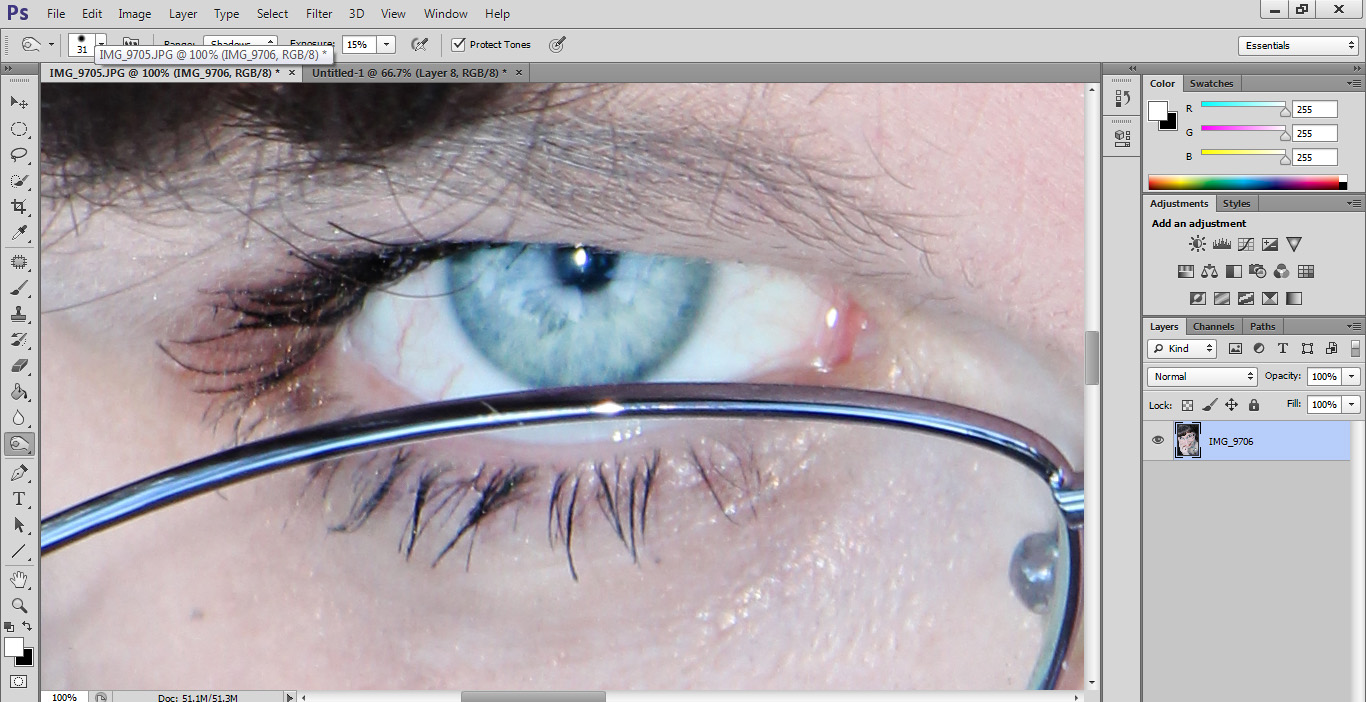
Photoshop Tutorial: Making eyes Pop! Stand out from the crowd.

I did a photo shoot for a friend to help her with some headshots and I did a couple of things to help her stand out from the crowd.


In this tutorial I will be going over how I made her eyes really look great and stand out to catch attention.


We Start with the original image and crop it to make it really get the story that we are trying to share. 


Start by using the Dodge tool, set your hardness to around the 50% mark, so you don't have to worry about being too accurate.


Then apply the dodge to the iris, making the blue's lighter.
Use the burn tool and set it for Shadows, exposure around 15%,  Hardness 75%  so you can be more accurate, and size to suit. Apply the tool to the rim of the iris and go over the pupil if you wish.
I followed this with a burn to the eye-lashes so they stand out more.
And applied to both eyes makes them just pop out at you so your client gets the best results.


Thursday, 6 September 2012

PREVIEW: Sony’s new action POV camera

actioncamera1
http://blog.sony.com/povcamera


Big news for the POV Camera Market, things are about to be shaken up big time!!


Sony is developing a brand new POV camera and the stats are pretty hot. Sony has given us a sneak peak of this device.  Straight from http://blog.sony.com/povcamera 


Our hearts are beating, our blood is flowing, our adrenaline is pumping. Here’s why: Sony’s developing a new type of hi-def wearable video camera for POV and action sports filming, and we’re giving you – our stellar fans – the first look at the device!
Profile shot of the POV Camera, easy to navigate.
Simple buttons to start and stop recording.
Carl Zeiss Tesser Lens baby!
Simple housing, Should withstand the extremes very well.
Going to be amazing!!!

Here is a quote from the Sony Blog:
The video camera is tiny and lightweight, but it houses Sony’s hallmark SteadyShot®image stabilization technology, Exmor® R CMOS image sensor, and an ultra-wide angle Carl Zeiss® Tessar® lens.
That means, whether you’re shredding major powder, jumping out of a plane, or kayaking through an epic waterfall, you’re capturing super high-quality video of it to show off to your family and friends. And there’ll be ruggedized and waterproof housings available so the camera can do its job in even the most extreme environments.
We’ll keep sharing updates and details about the product so be sure to stay tuned.

Tuesday, 10 July 2012

Macro Photography using Extension Tubes - What are Extension Tubes?

There is something magic about Macro photography that we all love doing and using the right equipment delivers amazing results that can take your breath away. 

A Macro Lens can start at about $500 up to $1500 or even more, and this is where I discovered Macro Extension Tubes, they turn any lens into a macro lens for life size photography. Macro Extension Tubes have very exciting results for half the cost of a new lens.
Auto Extension Tubes
You can get Manual Focus or Auto Focus Extension tubes, for most subject you shoot Manual Focus is easier because in Auto the camera might have trouble finding focus so close.

Each Tube has a multiplier effect on the minimum focusing distance.

For Example the Canon EF-S18-55mm IS Lens has a minimum focus distance of 0.25m you can get:
1.5x = 0.16m
2x = 0.125m
3x = 0.083m.
1.5+2+3x = 0.027m


So you get get so close to anything at all. This is how close you can get without the tubes:

This is how much closer you get using the tubes:

1.5x Tube

2x Tube

3x Tube
1.5x + 2x + 3x Tubes

I would love to give you a demonstration so come in and see me at Macarthur Camera House.

Tuesday, 26 June 2012

Interview with Local Photographer Luke Clements


This is The Bad Cam’s first Local Photographer interview.  

I am interviewing young photography talent Luke Clements who is an up and coming young man who is very driven about his photography. Based in Macarthur he loves shooting unique surf and seascapes.  You can see his work on his website, it has to be seen to be believed! An amazing talented young photographer and we are happy to share him with you today!

The Green Room

So you are a local Photographer to Campbelltown, where are you based?

Yes i am, I'm based around the Macarthur region but also have a good following and base around Wollongong and the south coast.


How do you Share or advertise yourself? Websites, blogs, magazines?

I mainly use my facebook page and website, I have also had images published on websites such as fluidzone, swellnet and http://bellyspin.wordpress.com/

Sweet as! How long have you been interested in photography for?

My interest in photography started when i was in yr 11 at school and chose to do photography as side subject during my HSC, so I've been interested for about 4-5 years now.

4-5 years is a good time to be learning! What subjects do you enjoy shooting the most? 

Yea, definatly Surf and seascapes, but I love capturing stunning sunrises and sunsets as well.


Ah calssic! What gear do you use at the moment?
In my camera bag at the moment I have a Canon 7D, Sigma 70-200mm f2.8 (which is my main lens i use at the moment), Canon 50mm f1.8 and Canon 580 EX II speedlight.

That is a great kit mate. Any other gear you like to carry?
Yea thanks, I have my manfrotto tripod not exactly sure of the model but it has the ball joint trigger head which is great! That's it at the moment as I'm saving up for a wide angle lens as I'm having to borrow a friends wide angle for doing certain shoots.

I love wide angle lenses, they really take alot in. Where do you find inspiration for your photography?

So do I! It's so annoying at the moment not having one on hand all the time. I find inspiration from other surf photographers such as Ray Collins, Clark Little just to name a couple. I also am a huge fan of Ken Duncans' work with his stunning landscapes!

Interesting tell me more. 

Clark Little is probably one of my favorite photographers, he shoots in some absolutely crazy waves around his home in Hawaii and puts his body on the line to get that shot he wants.
Ken Duncan has travelled to places that I have been wanting to go for a couple years now to shoot and capture those breathtaking landscapes that not many get to see.

Surf and Landscape photography must be challenging and rewarding for you, any advice for people looking to get into this area? 

Yes! Definatly challenging but yet rewarding as it does involve lots of early wake ups to get that shot your looking for especially those stunning sunrises and the nice smooth and glassy ocean shots, but once you get that shot it is the greatest reward from that hard work you put in.
So for anyone who wants to do surf and landscape photography be prepared to have those early cold mornings and always look for a new angle or perspective that hasn't been seen before and just be patient as it that shot you want may not happen straight away.

You are good at this! Where is your favorite spot to take photos?

Thanks! I'd have to say my favourite spot to shoot although I haven't been there much is around Ulladulla because it just has amazing seascapes and also some really nice country areas near by, it's just one of those places that you will always find a stunning shot if you look hard enough.

If money were no object and you could build your dream kit, what would be in your kit now?

Well there are so many great options but I think I would have to choose this; the Canon EOS 1DX and a 5D mk III, Canon 16-35mm f2.8, Canon 24-70mm 2.8, Canon 14mm f2.8 (which i would use to capture in water shots of the surf) Aquatech water housing, I'd have a canon 600mm f4, Canon 70-200mm 2.8 and the Canon 600 EX RT speedlite, which i would use to capture some shots of the surf at night in the water with my waterhousing setup.
I think this kit would cover all my favourite areas of photography to capture them at its best.

This has been a lot of fun chatting to you about your passion, Anything you'd like to add?

Yea it has, just for those who havent seen my work before go check it out and enjoy also want to say thanks to Macarthur Camera House as they are my go to guys for all my gear.

Fantastic so please share your links.
Here are the links to my website and my facebook page.

www.lukeclementsphotography.com

https://www.facebook.com/pages/Luke-Clements-Photography/203798346297012

I am a passionate photographer and this is my webpage to display my work, so check it out and enjoy! 


Best of luck with your photography mate, and thank you for taking the time to chat with my followers and myself.

Thursday, 21 June 2012

Nikon D3200 Review

The Nikon D3200 has many great new features for an Entry Level Beginner's camera.
Nikon D3200

The Nikon D3200 is a versatile all round performer that is so easy to use you can capture your special moments wherever life takes you. Packing an incredible 24.2 Megapixels, DX CMOS sensor, the easier-to-use Guide Mode, Full HD movie recording and an 11-point AF system, the D3200 creates beautiful images in every situation.


One of it's best features is the Intuitive Guide Mode. The Guide Mode has improvements over the D3100 and is even simpler to navigate. The Guide Mode takes you step by step on how to take a photo. The battery is the same as the D3100 and the D5100. It will last you 450-540 photos. Always advise a second battery especially for Video use.

New layout
The Video controls are more intuitive and has been placed on top of the camera next to the photo taking button. The great thing about Nikon Video is you can be in any mode and start video recording. The Full-HD Video looks great on any big screen TV and makes family videos a breeze. Using the ME-1 is the perfect companion for Movie making. The ME-1 is able to cut the noise created by the cameras mechanical operation, as well as reducing unwanted ambient noise like blowing wind.
accessories
Left: ML-L3 Remote | Right: ME-1 Microphone
Another great feature from Nikon is the introduction of the Infrared Port so you can use the ML-L3 remote control with it. No more cables to shoot your family portraits with! It has a very quick response mode and a 2 second delay mode.

WA-1 Wireless Mobile Adapter

The D3200 is also WiFi compatible using the Wireless Mobile Adapter, WA-1a, to transfer your images from your camera to your Smart Devices, also the camera's live view display can be shown through the screen in your Smart Devices as a remote control.

Initially, the WU-1a is compatible only with smart devices running the Android OS. However, additional support for Apple iOS is scheduled for release soon. The WU-1 is available separately for purchase.

Monday, 11 June 2012

How to create a Transparent Watermark to protect your photos in 7 simple to follow steps!


Create a new file.
  • Any size you like
  • Use a transparent background

Create your Shape/Text Layer

Reduce the Opacity to 20%

Save Photoshop Document

Open the image you wish to place your Watermark on.

Place... your Watermark on the image.

And Huzzah! A watermark on your image so no one else can rip off your images.